Guide
Creating and managing purchase orders
Turn buy-plan recommendations into draft purchase orders, approve and receive them, and keep an eye on supplier performance.
Purchase orders in Skuvelo start from the buy plan rather than a blank form, so the line items on a draft already reflect what you actually need to order.
Create a draft from the buy plan
On Plan → Replenishment, tick the SKUs you want to order and click Create draft POs. Skuvelo groups your selection into one draft purchase order per supplier and delivery window automatically, so a mixed selection across several suppliers doesn't need to be split by hand.
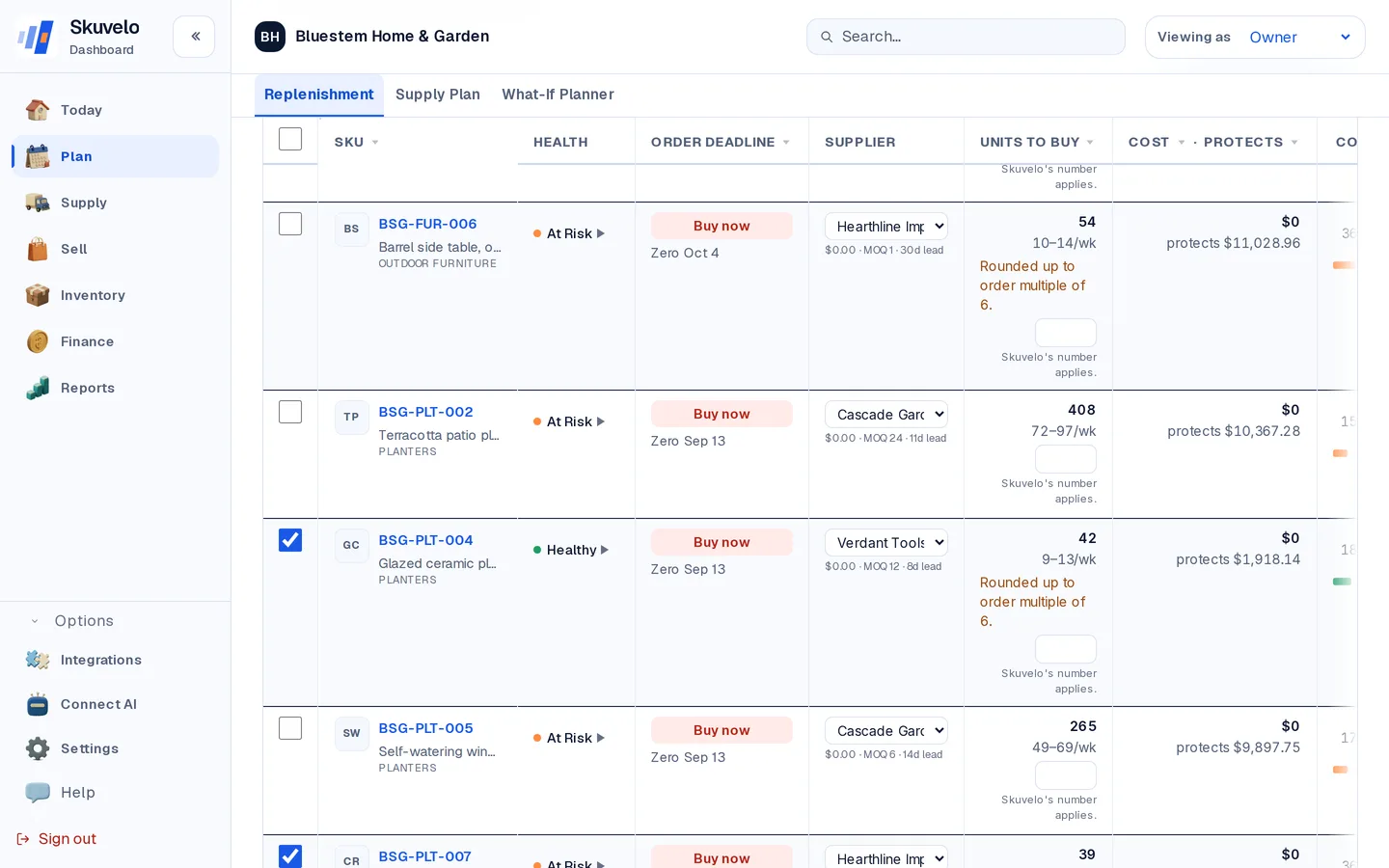
The grouping preview shows exactly what will be created — one draft per supplier and delivery date, with its line count listed — before anything is confirmed. From here you also choose how each order may ship: complete only, or partial shipments accepted.
Review and approve
Every draft opens on a review screen: lines, terms, and the cash approval will commit. Nothing reaches your supplier until you approve it. Approving freezes that version and generates the branded PDF for your supplier. Skuvelo doesn't email it for you: use Download PDF and send it to your supplier by email yourself. Later approved versions are kept too, each with its own Download PDF link, so the document you actually sent is preserved exactly as it was sent.
If your team has a spend policy and a draft is over what that policy lets you commit on your own, the button itself carries the order total — it reads Submit $4,900.00 for sign-off where it would otherwise read Approve $4,900.00. Confirming then says plainly that the order goes to someone else, and nothing is committed or sent until they sign it off. When the page can't be sure, the button says Approve and the confirmation explains that the order may still go to someone else for sign-off; the page shows which happened as soon as you confirm.
Orders waiting for sign-off are named at the top of Today for anyone whose role can approve purchase orders, on a desk or a phone: how many are waiting and what they total (one figure per currency), with Review opening Flagged items & approvals, which lists the same orders. If only one order is waiting and it's already Today's top decision, the line steps aside rather than repeat it.
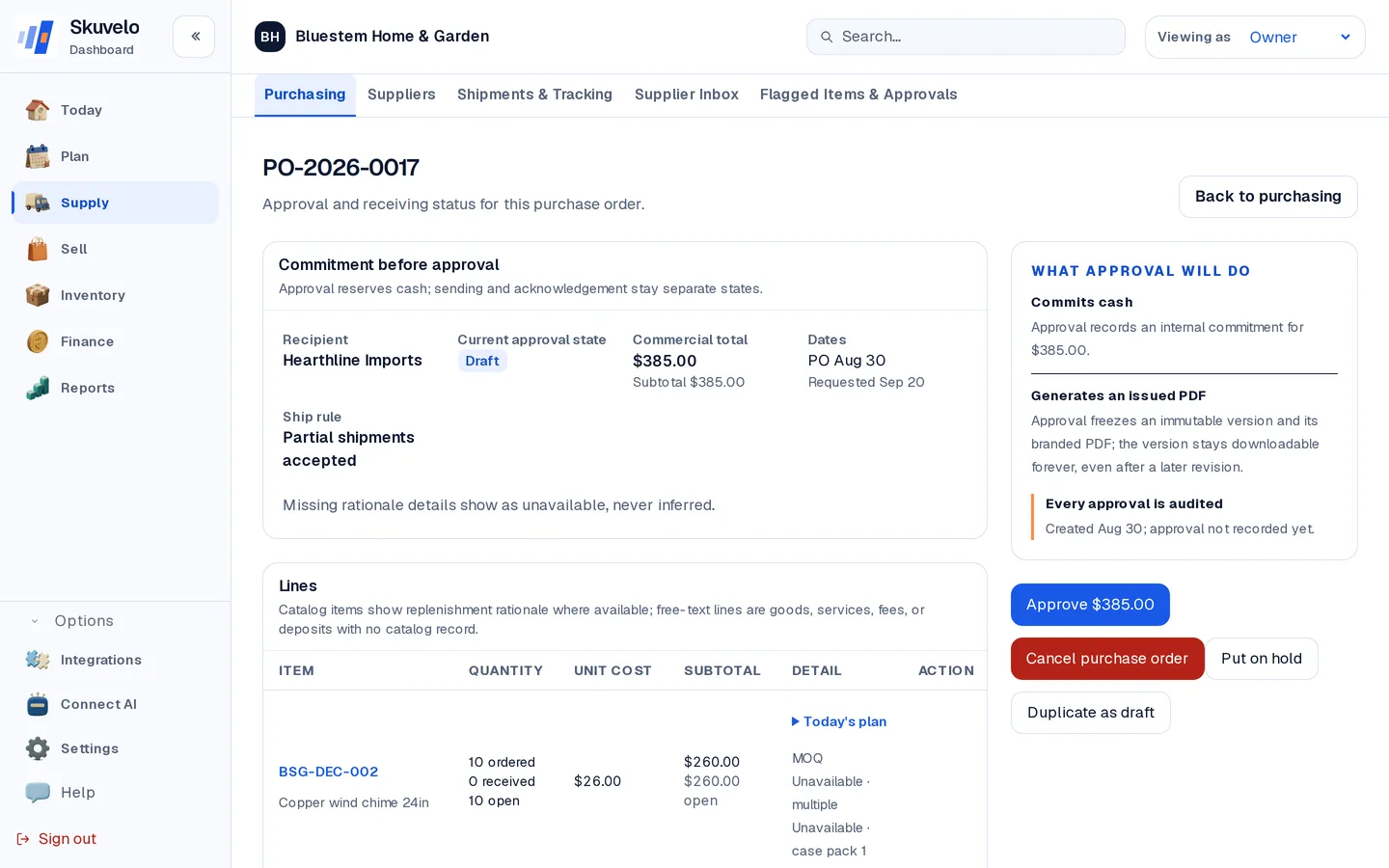
Need a similar order again later? Duplicate as draft on an existing PO copies the recipient, terms, notes and lines into a fresh draft — approval history and receipts never carry over, so the copy always starts clean.
Set approval limits and a spend threshold
Owners and admins can put spending limits on approvals under Settings → Order approvals (the page is titled "Who can approve orders"). Everyone else can read the policy there but not change it. Every amount on that page is an ordinary money amount in the policy currency, shown with its symbol — type 2500 or 2,500.00 for $2,500. Amounts can have at most two decimal places.
- Tick Enable spend-based approval controls. While it is off, approvals work exactly as they did before.
- Set Policy currency (for example USD). Orders in another currency can't be checked against the policy yet, so they are refused until they use this currency.
- Optionally set Elevated approval above. An order totalling more than this goes to Flagged items & approvals and needs someone other than the person who submitted it to approve it. Leave it blank for no threshold.
- Only Owner, Admin and Purchasing members can approve purchase orders, and owners and admins never have a limit — so the role limit is the largest order a Purchasing member may approve. Under Approval limit by role, click Add a role limit and type that amount; it can't be left blank. While the controls are on, a role with no limit can't approve any order, and
0means the same. - Under Approval limit for specific people, click Add a person's limit and pick a Purchasing member by name or email. Their amount replaces their role's limit; leave it blank and they use the role limit, which the empty field names. A limit saved earlier for someone who can't approve, or for a role that can't, is marked as having no effect; remove it if you like.
- Remove takes a row out. Click Save approval policy when you are done; if anything needs fixing, the field says what is wrong and nothing is saved.
Approval bands
Under Approval bands on the same page you can go further than a single limit and require specific people to sign off as the order value climbs. Click Add band and set:
- From — the order amount where this band starts applying, in the policy currency.
- Approvals needed — One or Two. Owner is always an eligible approver and can't be unchecked; tick any other roles this band should also accept.
- Specific approvers (optional) — narrow the band to named people instead of anyone with an eligible role. Leave it blank to allow any member with an eligible role, in addition to owners.
- One approval must be an Owner — when checked, at least one of the two approvals on this band has to come from an owner, whoever else also signs.
A supplier flagged for extra approval — on the supplier's own page, Orders need extra approval — moves that supplier's orders up one band, regardless of the order's own total.
An order waiting on a band shows the reason and who is still eligible to approve it right on its row in the awaiting-approval list, so you don't need to open the order to see what it's waiting on. If you've turned on alerts under Settings → Notifications, an eligible approver also gets a web push notification on the device where they opted in.
Cancelling or pausing an order
Cancel purchase order is offered only before approval: on a draft, or on an order still waiting for sign-off. No PDF has been issued at that point. The cancelled order stays in your history; it can't be reopened, only duplicated into a new draft.
Someone who can approve has two other answers to an order waiting for sign-off, and they mean different things. Reject purchase order, on an order waiting for sign-off, is a separate, final outcome from cancelling — it does not cancel the order. The order's status becomes Rejected, it stays in your history exactly as it was submitted, and it can't be reopened or resubmitted; the only way forward is duplicating it into a new draft. Request changes returns the order to Draft instead, so the person who submitted it can fix it and submit it again — nothing is thrown away. Either way, the reason the approver gave travels with the order: it's quoted on the order's own page (with who decided and when, and the order's full approval history below it). A recently rejected or changes-requested order is also named on Today, and listed with its reason in Flagged items & approvals.
Once an order is approved there is no cancel button. Put on hold pauses purchasing follow-up without cancelling the order and asks for a reason; Release hold returns it to the stage it was at. Hold is offered from draft through partially received. Cancel, hold and release need a role that can create purchase orders: owner, admin, planner or purchasing.
Receive a purchase order
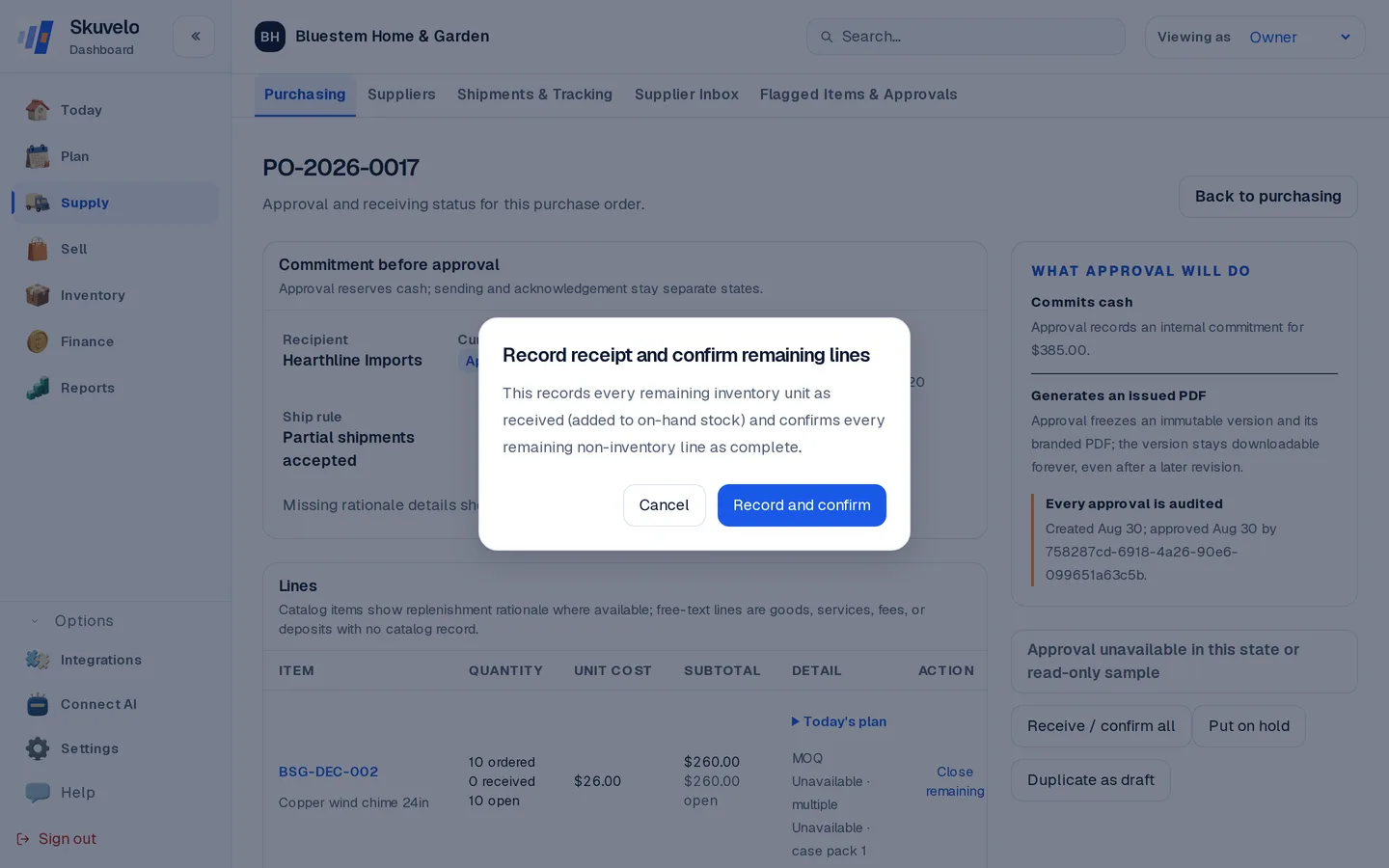
When a delivery from your supplier arrives at your warehouse or store, log it in by receiving it against its order: open the order under Purchasing and click Receive. Each line starts at its full remaining quantity; lower a line for a partial delivery, and anything left unreceived keeps the order open. What you record posts to on-hand stock as an audited movement. (An order that mixes inventory lines with non-inventory ones — freight, fees, deposits — shows Receive / confirm instead, and confirms those non-inventory lines as complete at the same time.)
On an order of stock lines you can split what arrived, per line, into accepted, damaged, and rejected quantities:
- Accepted units go on-hand as ordinary, sellable stock.
- Damaged units count as received and go on-hand as damaged stock that can't be sold, and the line is flagged for review.
- Rejected units are not added to your sellable stock at all. A rejected line gets a Start vendor return link straight into a return-to-vendor draft, pre-filled with the product and quantity, so sending them back is the very next click.
- More than was ordered. Enter what actually arrived; Skuvelo asks you to confirm it as an over-receipt, then adds every unit to stock and flags the line for review. It never quietly records fewer than you entered. On an order that also has non-inventory lines, receive up to what is outstanding and record any extra units as an adjustment.
You can also record a per-unit cost variance against a line, with a note explaining it, and attach photos of the delivery or the damage. All of this — who received it, when, and the accepted/damaged/rejected split, cost variance, note and photos for every line — is kept on the order's own Receiving history, one entry per time you clicked Receive, so a discrepancy is never just a number that gets overwritten by the next receipt.
Every supplier's page also shows its damaged and rejected rates alongside on-time performance and fill rate, so a supplier whose deliveries keep arriving short or damaged stands out before you place the next order with them.
Keeping an eye on suppliers
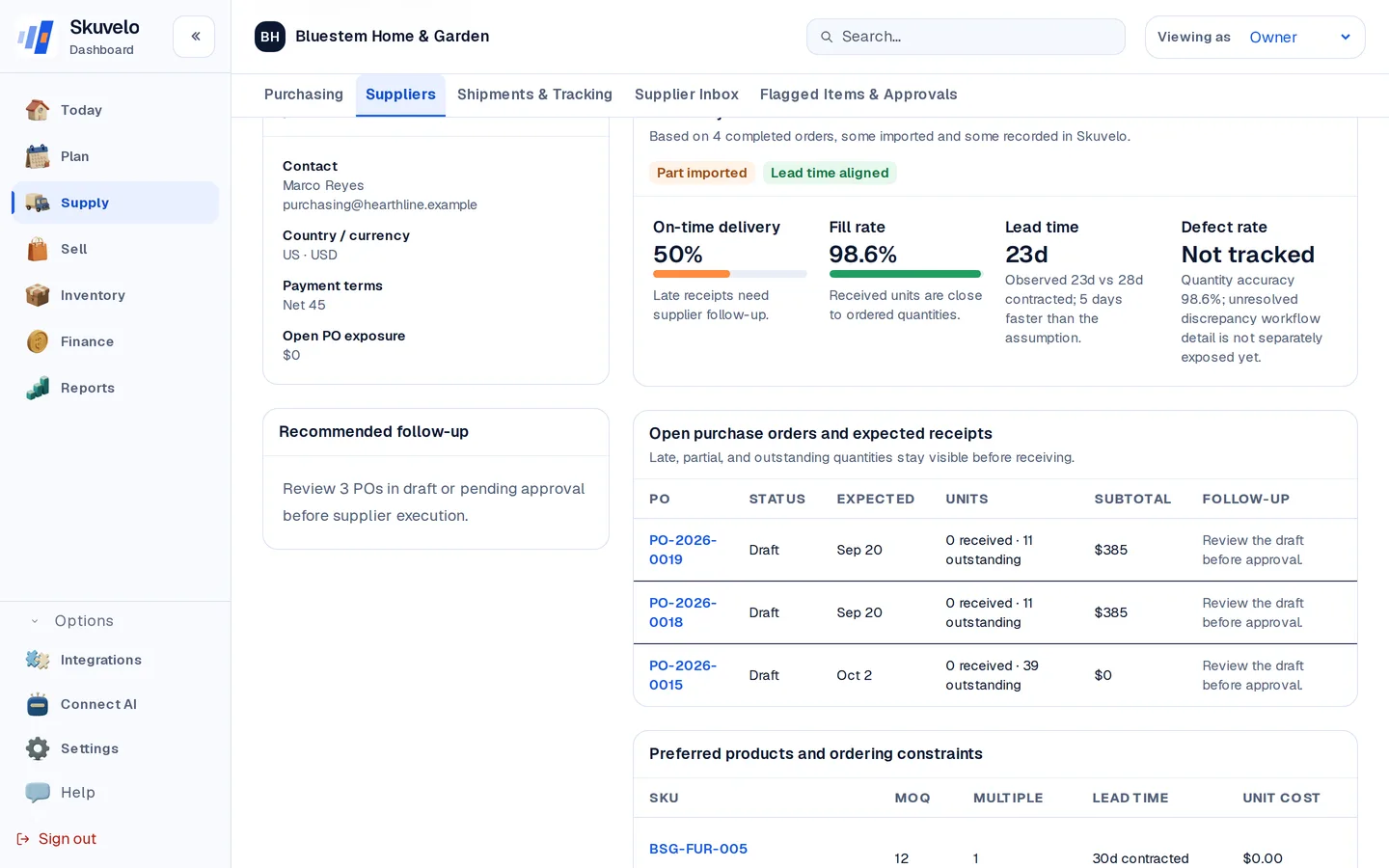
Suppliers ranks every supplier by follow-up priority — open orders, lead-time drift, and on-time performance — so the ones that need attention surface first rather than being buried alphabetically.

Open one for the full scorecard — on-time performance, fill rate, observed lead time, and every product linked to that supplier with its own ordering constraints (minimum order quantity, order multiple, lead time) in one place.
Try the plan on your own stock.
Start a trial with your own sales and stock, or look around the live demo first.